


Portal Highlight: Service Groups
- July 24, 2014
- RSS Feed
A common complaint we hear about regarding supplier web portals is that if a single person needs access to multiple companies, that person generally needs to maintain multiple accounts.
One of the core concepts in the Megaportal is the idea that all our services belong to a Service Group. A Service Group is owned by a company and permissions are granted against the Service Group. Services can belong to multiple service groups, and people or roles can be assigned access to multiple service groups. Permissions can be granted to people or roles, we’ll get to this in a moment.
Users & Roles
Users are employed by one or more companies and all users have a Role or Position assigned to them. This might be a job title, department or term that is significant to you and your company. Users can be granted permissions directly on a Service Group. You can take a more powerful approach though and assign a Role permissions on a Service Group. This way you can give your NOC team permission to view and modify services, and any new NOC staff that are added later automatically inherit the permission.
Service Agents
Implementing Service Agents is another concept that we feel is important in the Megaportal. Service Agents are users that can be “invited” to another company. For example, a customer can invite a third party contractor and grant the contractor select permissions to act on their behalf.
Take this example:
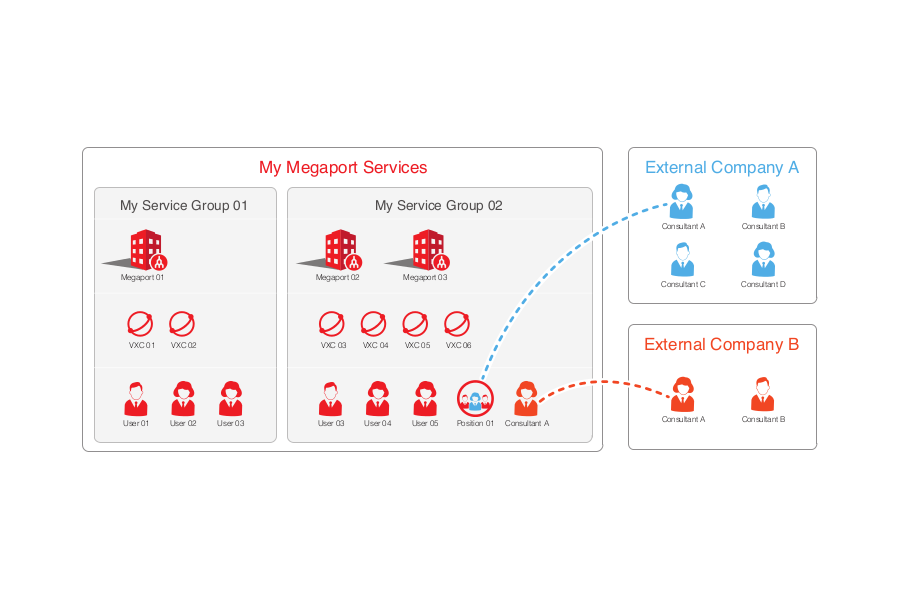
This company has separated their services under two Service Groups and added users to the groups they need access to. They also outsource some work to external companies who also need limited access to some of the services. The example above illustrates how these links work. A consultant from External Company A is assigned a position from the company which grants them any permissions inherited from that role. A consultant from External Company B has been added to Service Group 2 individually so the permissions applied to that user can be fine-tuned. It’s a simple example but the system is designed in such a way that it allows complex configurations.
Conclusion
We’re always looking for ways to improve and simplify the customer experience. If you have any ideas on things we can do to make the portal or the phone apps better, please make sure to let us know.